Automating a YubiKey for Agentic Logins
Agentic Logins
Agents! Coding agents, enterprise agents, personal assistant agents, computer use models, etc. You know the drill. We’ve gone quickly from tech demos to doing real work. Agents are all over the place being productive and helpful on your behalf (and hopefully not hacking into companies).
Sometimes, these agents need to go to websites to do things. Sometimes, these agents need to log in on your behalf to said websites. And sometimes, said websites make it really painful for agents to log in. This can be intentional (CAPTCHAs, anti-bot, etc) or unintentional (inscrutable authentication processes). The former is a whole can of worms around how we should design the future of the web for agents vs humans. Thankfully we are not going to open that can today. Instead, we’re going to talk about the latter: the pains of dealing with agentic login and one fun workaround I (unfortunately) had to develop.
I run a somewhat-sophisticated personal app that logs into a bunch of different web portals. These portals are not the shining example of modern machine/agent-ready websites. They don’t have APIs, MCP, or any interfaces that would make life a lot easier. So, interactive login and scraping is currently the best available approach. I have headless browser automation that uses a shared human-user credential for login. Typically this is username/password + some form of 2FA, depending on the web portal. That form of 2FA can range from TOTP, an SMS OTP, a phone call, an email code/magic link, a mobile app push approval, a security key, a passkey, etc.
Having started Duo, this diversity of 2FA methods is unsurprising. All of these 2FA methods were designed for human-interactive login, not automated/agentic use. It’s easy enough to give your agent a username/password to log in, but automating the 2FA step can range from a little more painful to a lot more painful. Note: Giving replayable credentials to a non-deterministic agent can be a dangerous proposition, but my automations are a bit more deterministic than pure computer use models.
So, let’s walk through each common form of 2FA and what we can do to automate logins:
| Method | What it assumes | Agent difficulty | How an agent does it |
|---|---|---|---|
| TOTP (authenticator app) | A shared secret on your phone | Easy | Store the TOTP seed and compute the OTP on-demand. |
| Passkeys / WebAuthn | A platform or password-manager authenticator | Easy | Store the key material and compute signatures on-demand. Some sites may require hardware attestation or user verification. |
| Email OTP | An inbox you read | Medium | Route email to an address/inbox that the agent can read, parse the code out, and race delivery delays. |
| SMS OTP | A phone with a SIM | Hack | Rent a virtual number (via Twilio) and receive the text via a webhook. Lots of dragons here with VoIP blocking, shortcode delivery, etc. |
| Voice call OTP | A person who answers and listens | Bigger hack | Again a virtual number, with speech-to-text transcription to extract the OTP out. An alternative model may require you to enter an OTP via DTMF. |
| Push approval | The vendor’s app on your phone | Biggest hack | You’d have to emulate the vendor’s mobile app. Not worth the squeeze. |
| Hardware security key (U2F/FIDO2) | A physical hardware key and user-presence touch | Hard, but we’re going to do it | The key never gives up its secret, and every signature needs a physical touch. Or does it… |
There are clearly pros/cons in terms of automating the different 2FA methods above. Note that this is different than the pros/cons of the security and usability of the methods. Maybe surprisingly, there is not an inverse correlation between security and automation (e.g. passkeys are strong, usable, and easy to automate). Again, in an ideal world, we’d have APIs/MCP and real delegated credentials for agents that are scoped, revocable, auditable. But, we’ve got to live with the web that we have today, until we get to a better place.
Automating a YubiKey Touch
Most of the portals that my app logs into support TOTP, SMS, or email codes. These are pretty reasonable to support. Clearly TOTP is the ideal setup. Email is ok, especially if you can set up a different user with a dedicated programmatic “inbox” (e.g. Resend). And SMS is decent with Twilio although there are some limitations with shortcode senders.
There is one critical web portal the app uses that only supports phone call OR a hardware security key (specifically, an attested Yubico YubiKey). The telephony-based phone call method works, but it can be a little flaky. Deliverability, audio quality, timing issues, transcription mistakes, etc. All the things you would expect from a POTS/PSTN call even if it’s happening via VoIP. So, I had the idea of trying to automate a YubiKey challenge/response. It’s not strictly necessary, but improves the reliability and security of the login process AND seemed like a fun challenge to take on.
The Plumbing
In a normal YubiKey login process, a website sends a challenge to the browser which interfaces with the YubiKey over USB via CTAP2. The user may type a PIN and touch the capacitive sensor of their YubiKey to confirm user presence.
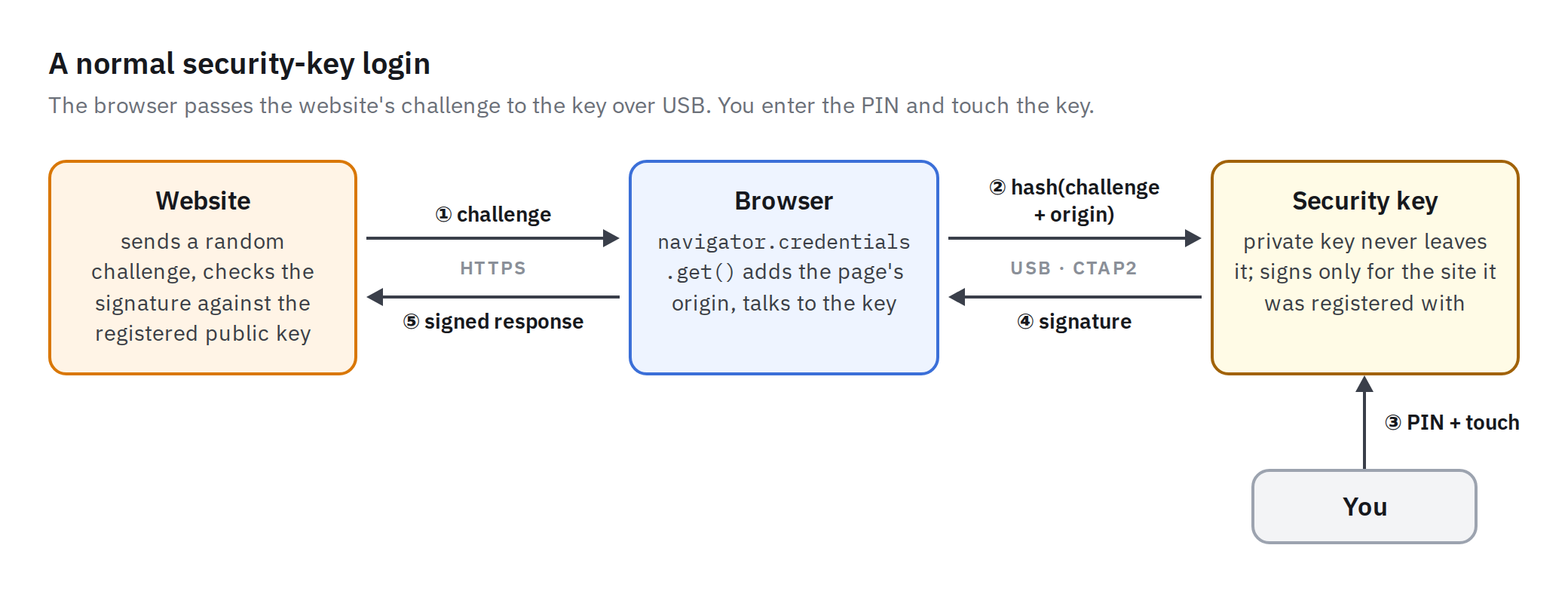
This doesn’t seem insurmountable to automate. We need some way to proxy the FIDO challenge from the browser and then some way to automate the physical touch/tap on the YubiKey capacitive sensor.
First, the plumbing/proxying part. This app runs on Vercel and the automations run from a disposable Vercel Sandbox. The automations are driven by Playwright with a headless Chromium browser. The YubiKey is hosted elsewhere (obviously not in the cloud), plugged into a USB port on a physical host that can communicate with the sandbox. When the app logs into the portal, the headless browser captures the FIDO challenge, relays it to this physical host, the challenge is transmitted to the YubiKey, the YubiKey “touch” happens, the signature response is generated, and the response is shuttled back to the sandbox and provided to the portal website. It looks something like this:
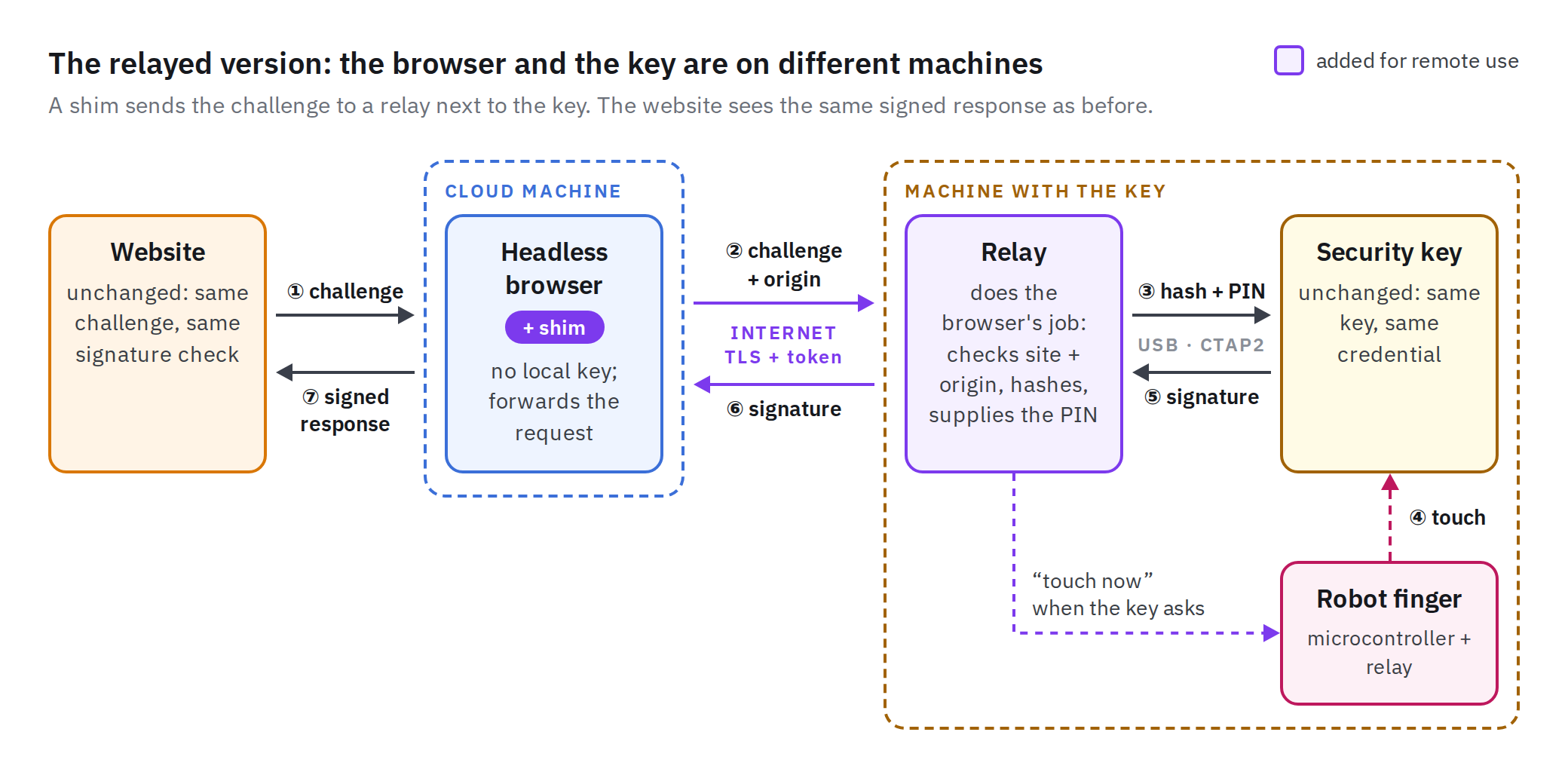
Security note: This isn’t just a YubiKey signing oracle sitting wide-open on the internet. There are a variety of compensating controls ensuring that only the automation in the sandbox can request a signature and only for a specific set of origins/URLs.
The Touch
Ok, this is the main event. The real question is: How can we automate the actual human touch/tap on the YubiKey?
Each YubiKey, regardless of form factor, has a gold contact that is a capacitive touch sensor. Its goal is to ensure there is some human verification for a login/transaction. That touch logic, if requested, is contained within the key’s firmware itself, so the YubiKey will not allow its private key material to sign a challenge without the touch.
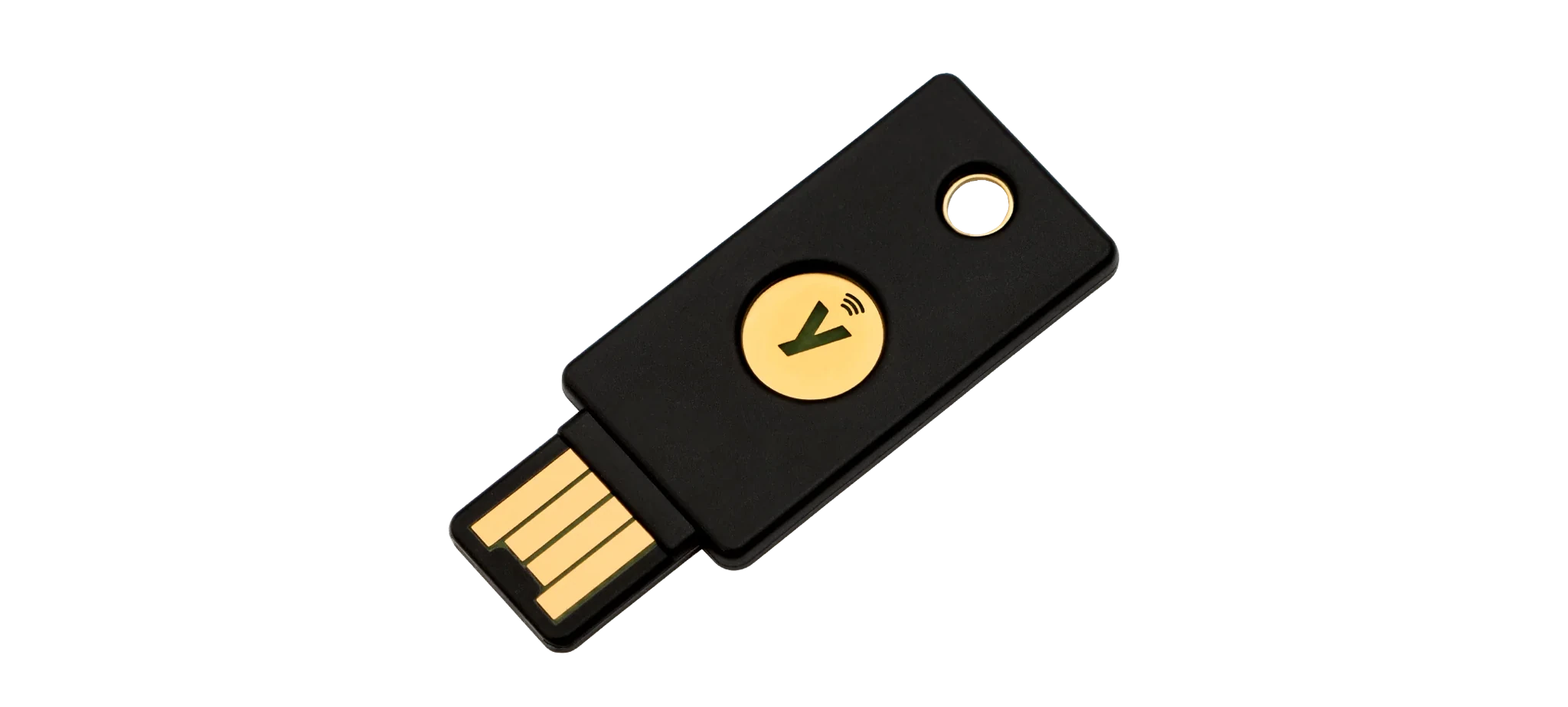
I’m not the first person to try to emulate a YubiKey touch. In 2022, Yossi Meloch at Cisco wrote about automating a YubiKey button press with a mechanical approach. A SwitchBot button pusher, triggered through its API, pressed a metal door pin key against the touch area, and a grounded headphone cable made the sensor read the metal as a finger. But I wanted something that was a little more production-grade and avoided any mechanical/moving parts.
My first experimentation was figuring out how I could manually trigger a “touch” without my finger acting as a capacitive ground. This turned out to be relatively straightforward. I taped a jumper wire to the YubiKey sensor with some conductive copper tape and was able to touch that wire to ground to trigger the YubiKey “touch” when prompted. Note that the capacitive sensor appears to go through some initialization/calibration when the key is first plugged in and powered up via USB, so you have to ensure your wiring is in its resting non-connected state.
Next was trying to introduce some switching in the process. Instead of the mechanical switch with moving parts, I wanted a simple relay switch that could be programmatically controlled to pull the sensor pad to ground to emulate the touch. This part took a fair bit of trial and error, mostly because I am far from an electrical engineer. I can debug software, but when weird things are happening in hardware-land, I’m at a bit of a loss. Thankfully, my father is an electrical engineer and I’ve got a good friend Claude who can help me along the way. After cycling through a few different switches, including a PC817 optocoupler that never quite worked (WTF is a picofarad and why is it throwing off my experiment?!), I found success in using a simple reed relay (SIP-1A05).
The last part was tying it all together with automation. The main brains of my setup is a Raspberry Pi Pico device. This is a USB microcontroller that can be easily programmed via MicroPython to receive touch requests via the on-host relay and then drive the Pico logic to “touch” our sensor. When the on-host relay sends the FIDO challenge to the YubiKey, the YubiKey will start sending CTAP keepalives with status UPNEEDED, indicating it is waiting for a touch. The relay program watches for that status and then sends a TOUCH 300 command over USB serial to the Pico, telling the running MicroPython program to “touch” the key for 300 ms. That “touch” event drives one of the Pico GPIO pins high to 3.3v, which is sufficient to power the reed relay coil (despite being rated for 5v) and close the contact, bridging the YubiKey sensor to ground and successfully triggering a “touch”.
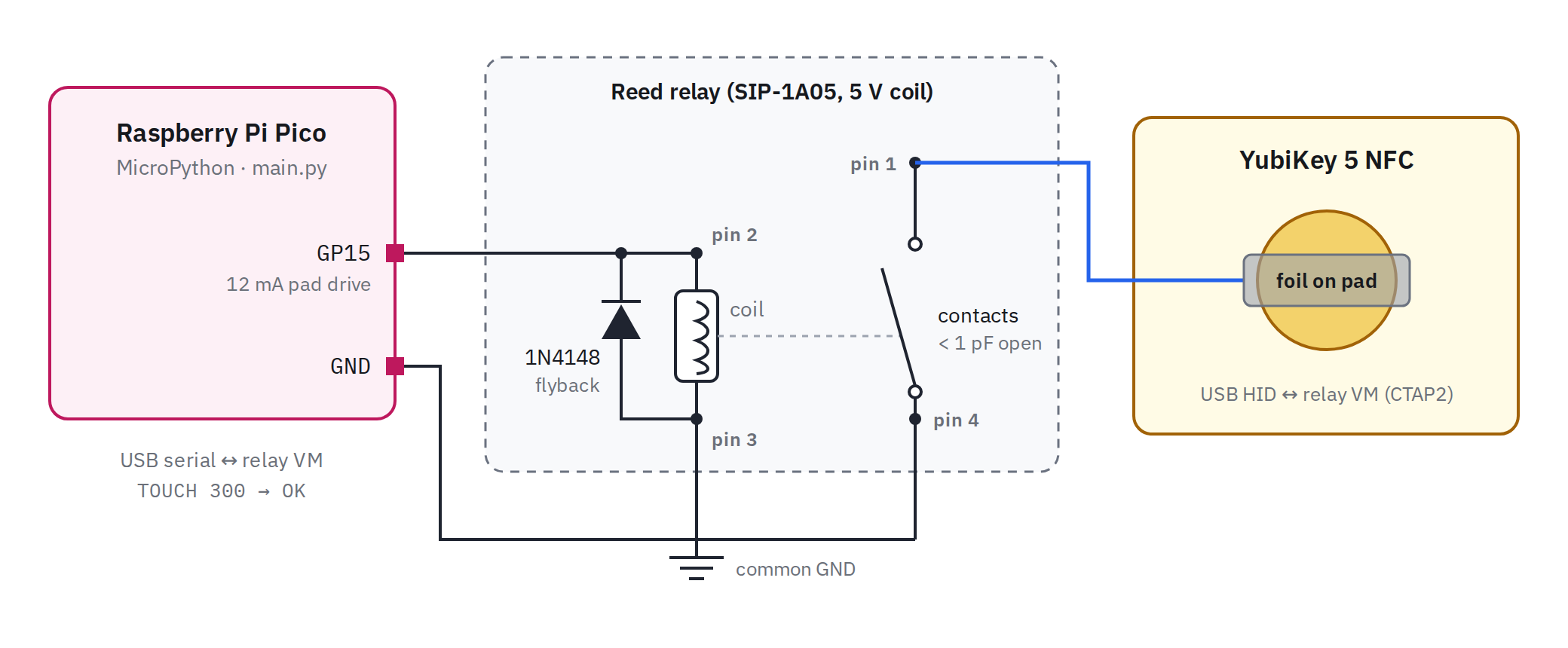
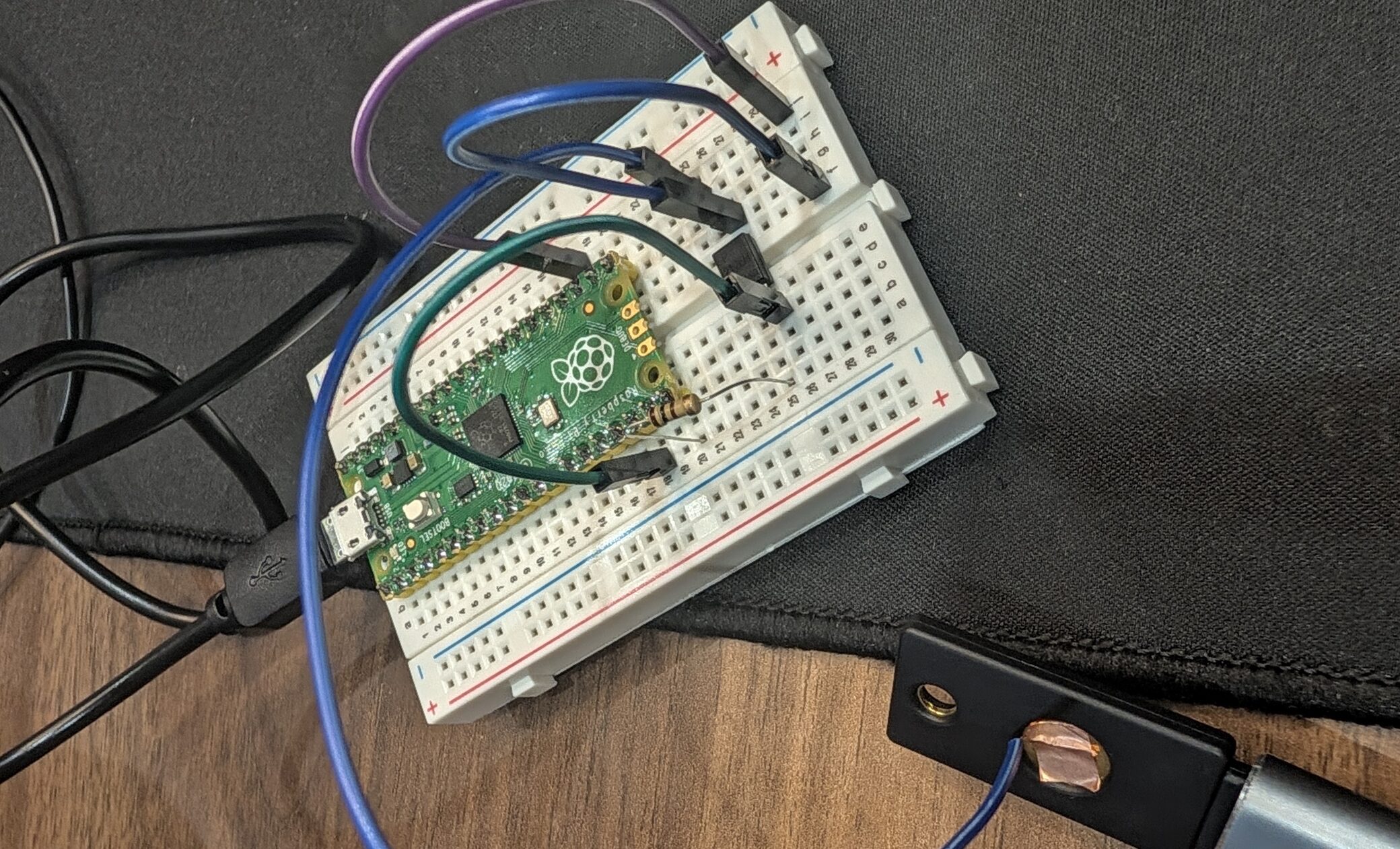
The experimental breadboard version (with the non-functioning PC817) was a bit messy:
But the production soldered version cleaned up nicely:
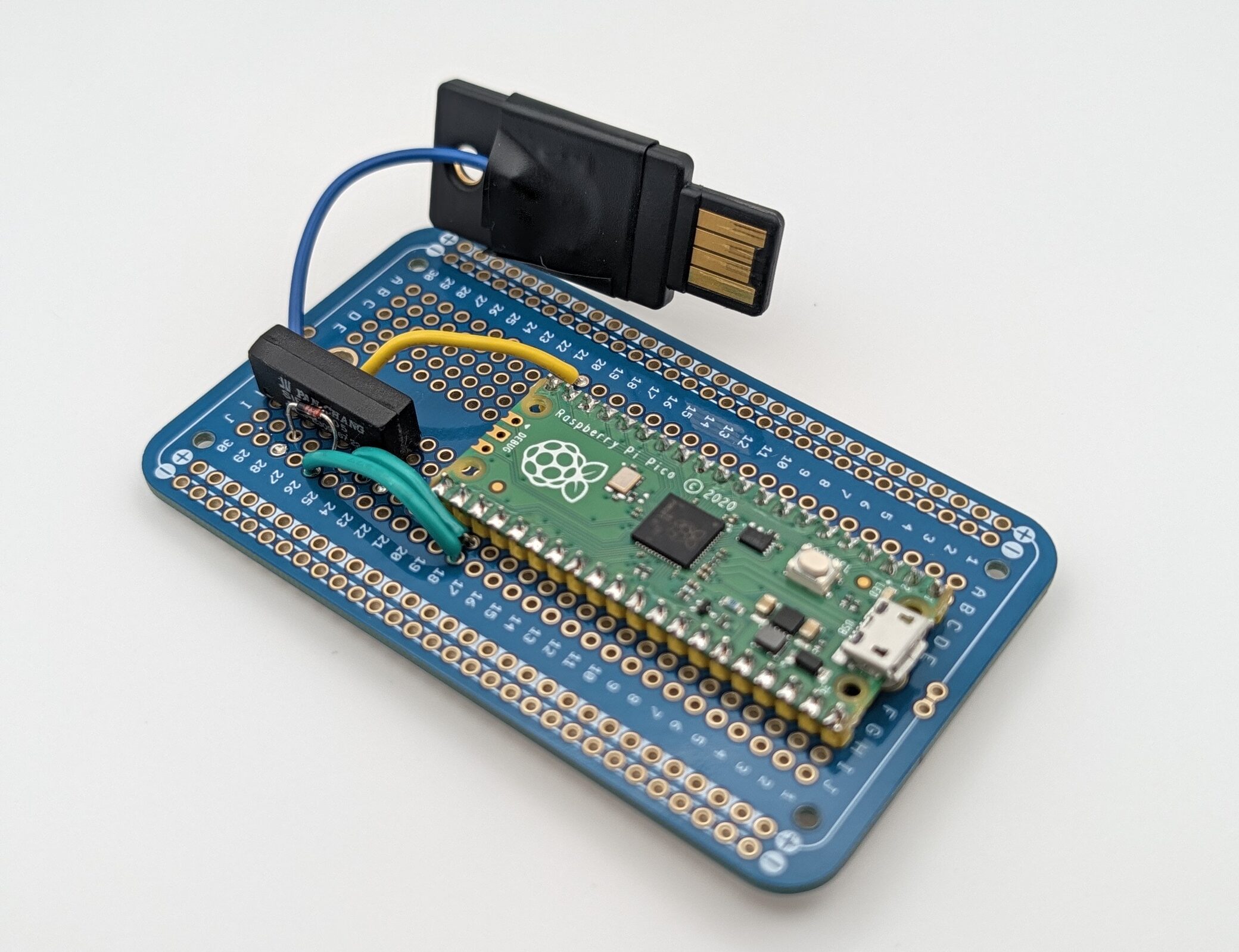
And, it worked! End-to-end, from the browser automation running in the Vercel Sandbox, to the relay running on the physical host, to the Pico driving the automated “touch”, and back again.
Is this a good idea? For my use case, yes. It is faster, more reliable, and more secure than the telephony-based login process that I was previously using. For the internet? Maybe. We have to be aware that future agentic access on the web may look very different than the last couple decades, and we’ll have to do a bunch of new work around agentic authentication and authorization. In the meantime, we’ll undoubtedly have to cobble together some hacks to make things work as desired.
Building Your Own
Software
All the required software for (1) the Playwright browser shim in the Vercel Sandbox, (2) the relay running on the physical host, and (3) the firmware running on the Pico were all written by Claude Code. If you’re interested in checking out the code, just ping me and I’ll clean it up and post it on GitHub. Given that this is very tailored to my specific application and use case, it would probably be easier just to ask Claude to build it for you!
Hardware
Here’s a quick parts list, if you want to duplicate my exact setup described above.
| Part | Where to buy | Notes |
|---|---|---|
| YubiKey 5 NFC (USB-A) | Amazon, Yubico | Dedicated hardware key for the agent. |
| Raspberry Pi Pico H (RP2040) | Amazon, DigiKey | Runs MicroPython. Needs a micro-USB cable. |
| SIP-1A05 reed relay | Amazon, DigiKey | The one relay that worked. Or SIP-1A05D if you want a built-in diode. |
| 1N4148 diode | Amazon, DigiKey | Flyback protection across the coil. |
| Conductive copper tape | Amazon | A small square on the key’s touch sensor. |
| Solid tinned copper wire | Amazon | Whatever wire you want. |
| Solderable breadboard | Amazon, Adafruit | For a more finished/soldered version. |